Animation kaise kaam karta hai (code se video)
Reel mein promise kiya tha: ready mobile scene template. Ye raha. Download karo, apne brand ke rang daalo, aur reel ke scenes code se banao.
Na After Effects, na timeline pe drag-drop 🎬
AI se video kaise banaye
Ye guide part 3 ka hai. Pehle reel dekho, phir yahan se step by step karo.
- 1Poora setup: Claude Code + exact prompt + free voice clone
- 2Apna 2D character kaise banaye
- 3Animation kaise kaam karta hai (code se video)tum yahan ho
- 4Captions perfectly sync kaise hote hain
- 5Ek reel ka asli kharcha, aur free mein kaise banayejaldi aa raha
Video = frames
Video asal mein photos ki line hai. Reel mein 30 photos har second. 6 second ka reel = 180 photos. Animation bas itna hai: har photo mein cheez thodi si alag jagah ya alag size pe.
- Har frame ek web page hai. Remotion mein scene React se likhte ho. Page ko bas ek cheez pata hoti hai: abhi kaunsa frame hai.
- Headless browser kholta hai. Chrome bina window ke, frame 0, 1, 2... har ek ko load karta hai aur screenshot leta hai.
- Sab jod ke MP4. Saare screenshots aur awaaz ko FFmpeg ek video mein silta hai.
// frame = 0, 1, 2 ... 179
const frame = useCurrentFrame();
// frame 15 pe 0 se 1 tak jaata hai, thode bounce ke saath
const pop = spring({ frame: frame - 15, fps: 30 });
Phir scale(pop) laga do: cheez frame 15 pe uchhal ke aati hai. Har frame same code, sirf frame number badalta hai. Isliye result har baar same aata hai.
Gehraai mein padhna hai? Remotion fundamentals dekho.
Cheez us word pe aaye jab bola jaaye
Reel tab "professional" lagta hai jab number wahi pal aata hai jab tum number bolte ho. Iske liye har word ka time chahiye. Whisper (free) awaaz sun ke deta hai:
[
  { "word": "Five", "start": 0.20, "end": 0.50 },
  { "word": "tips", "start": 0.50, "end": 0.85 },
  ...
]
Template mein ek chhota helper hai: word ka number do, frame milta hai.
export const atWord = (n: number, fallbackSec = 0) => {
  const w = WORDS[n];
  return w ? sec(w.start) : sec(fallbackSec);
};

// scene mein:
<Title text="5 tips for better reels" at={atWord(0)} />
<BigNumber to={5} at={atText("tips")} />
<Sticker text="save this" at={atText("pop.", 1.75)} />Ready mobile scene template
1080x1920, 30fps, Remotion + TypeScript. Ek "5 tips" example scene ready hai.
⬇ reel-scene-template.zip ~55 KB, MIT licence
Andar kya hai
brand.ts: ek jagah rang, font, corners, shadow, handle. Badlo aur sab badal jaata hai.presets.ts: 2 ready looks, clean light aur bold dark.layout.ts: Instagram ke safe zones, naam ke saath.timing.ts:atWord(n), word pe pop.- Components: Title, Card, BigNumber (count-up), Sticker, CaptionStrip (word by word highlight), CharacterSlot (yahan apna character daalo). Sab spring pop-in ke saath.
- README: apna voiceover aur naya scene kaise jodna hai.
3 commands
Pehle Node.js install ho. Zip kholo, us folder mein terminal kholo:
npm i
npx remotion studio
npx remotion render
studio browser mein live preview kholta hai. render composition poochta hai aur out/ mein MP4 bana deta hai.
Render pe "browser not found" aaya?
Apna Chrome use karwa do (Mac pe):
npx remotion render Scene out/scene.mp4 --browser-executable="/Applications/Google Chrome.app/Contents/MacOS/Google Chrome"
Template MIT hai. Remotion ka apna licence hai: individuals aur chhoti teams ke liye free, badi company ho toh remotion.dev/license dekh lo.
Apne brand mein badlo
Saare rang aur font ek hi file mein hain. Isko badlo, pura template re-skin ho jaata hai:
export const brand: Brand = {
  colors: {
    bg: "#F5F5F2",      // background
    surface: "#FFFFFF", // cards, captions
    text: "#14161A",
    accent: "#2B6CF6",  // number, highlight word
    accent2: "#12B886", // stickers
  },
  font: "Inter",        // ya "SpaceGrotesk", ya apna Google font
  radius: 32,           // 0 = sharp corners
  shadow: true,
  handle: "@yourhandle",
};
Khud nahi karna? Template folder mein Claude Code kholo aur ye prompt paste karo. Brackets [ ] bharo:
I downloaded this reel scene template (Remotion, 1080x1920 vertical). Make it mine.

MY BRAND (fill these in)
- Colours: background [#...], cards [#...], text [#...], accent [#...], second accent [#...]
- Font: [any Google font, e.g. Poppins]
- Handle: [@yourhandle]
- Character: [an image in public/, e.g. public/me.png, OR describe one: "a simple SVG cat with round glasses"]
- Scenes I want: [e.g. 1) hook with a big number, 2) three tips one by one, 3) follow call to action]
- Voiceover: [public/vo.wav + public/words.json from Whisper, OR "no audio yet, time it in seconds"]

WHAT TO DO
1. Read README.md and everything in src/ first.
2. Re-skin only through src/brand.ts (add my font in src/fonts.ts). Do not hard-code colours or fonts inside components.
3. Put my character inside CharacterSlot.
4. Build my scenes as new compositions in src/Root.tsx, reusing the existing components. Every element pops in on the word where it is spoken, using atWord / atText from src/timing.ts.
5. Keep all text, numbers and faces inside SAFE_BOX from src/layout.ts. Do not change the safe zone values.
6. Render a still of each scene, once with debugSafeZones on and once off (npx remotion still). Look at every image yourself and fix: text overflowing, things overlapping, low contrast, anything inside the red zones. Then show me the stills.
7. After I say ok, render the MP4 with npx remotion render.
Instagram tumhara reel dhak deta hai
Reel ke upar Instagram apne buttons aur caption chipka deta hai. Agar tumhara text wahan hai, toh koi padh nahi paayega. Template mein ye zones pehle se set hain (approx, phone aur app version ke hisaab se thoda badalte hain):
| zone | size | wahan kya hai |
|---|---|---|
| upar | ~220px | Reels header, camera icon |
| neeche | ~380px | username, caption, audio, comment box |
| right | ~120px | like, comment, share, save |

Laal = Instagram ka UI yahan aa sakta hai. Hara dabba = safe. Check karne ke liye: --props='{"debugSafeZones":true}'
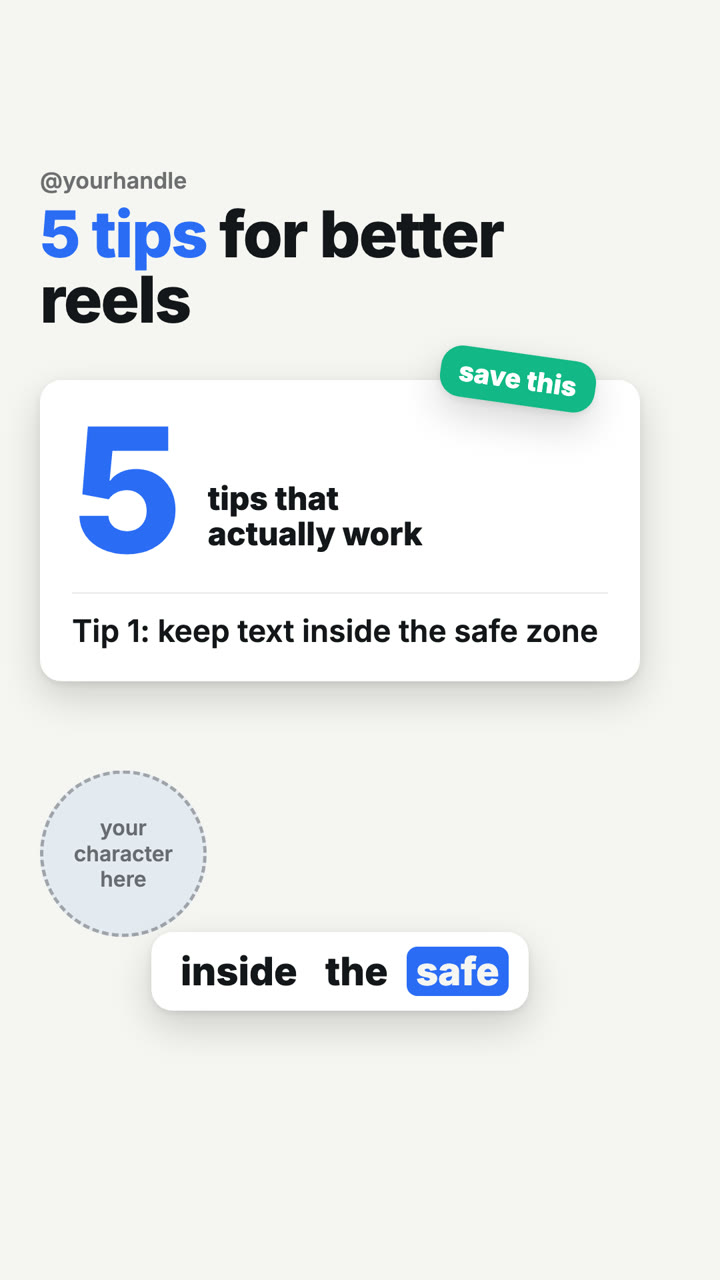
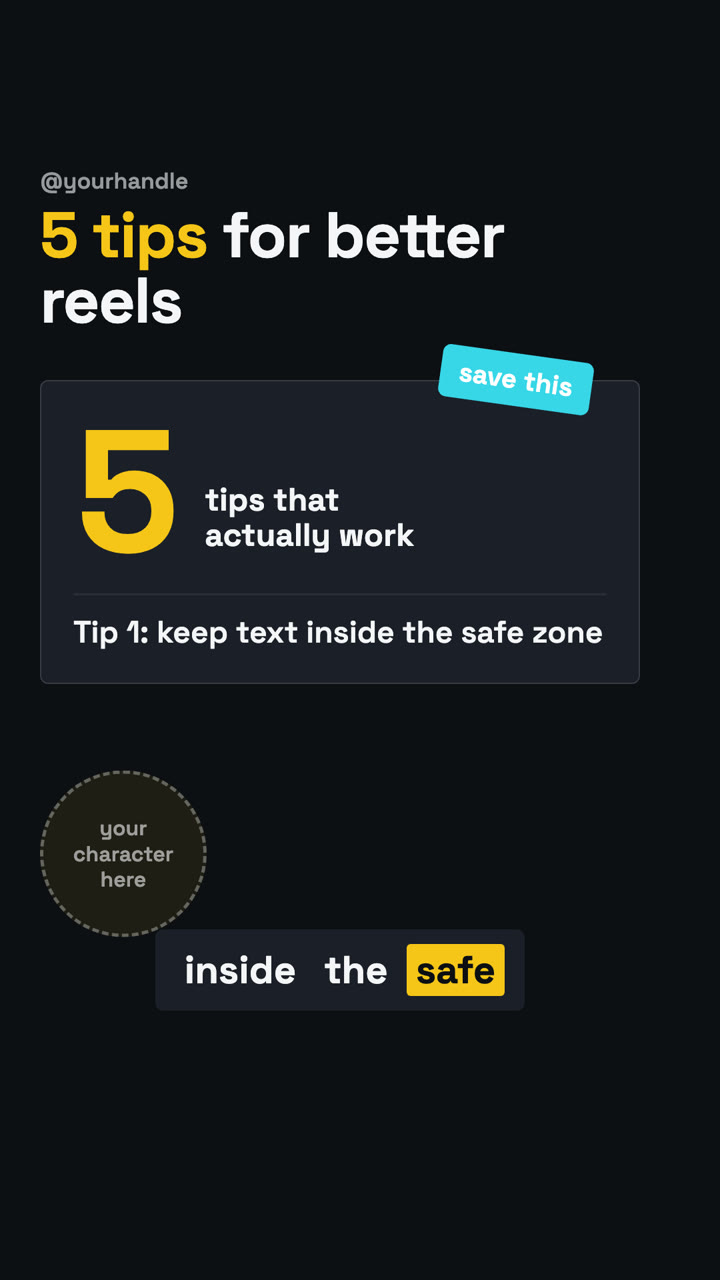
Same scene, 2 brands
Code ek hi hai. Sirf brand badla:
Series mein aage aa raha hai
- Captions perfectly sync kaise hote hain (part 4)
- Ek reel ka asli kharcha, aur free mein kaise banaye (part 5)
Miss na ho, isliye follow kar lo 🔔
Ye "AI se video kaise banaye" series ka part 3 hai. Setup nahi kiya? Part 1 se shuru karo. Character chahiye? Part 2.
follow karo @techstackbro 👀