Design skills ka collection. Isme landing-page-design aur figma-designer hain. Hum landing-page-design use karte hain.
Claude se premium website, hosting ₹0
AI se bani website door se pehchaan mein aa jaati hai. Ek free design skill Claude ko designer ke rules deta hai. Phir index.html ko Cloudflare Pages pe free mein live karo, aur Google Maps aur QR se customers tak pahunchao.
4 steps: skill, prompt, deploy, Maps + QR ▶
Follow @techstackbroAI wali website ki pehchaan
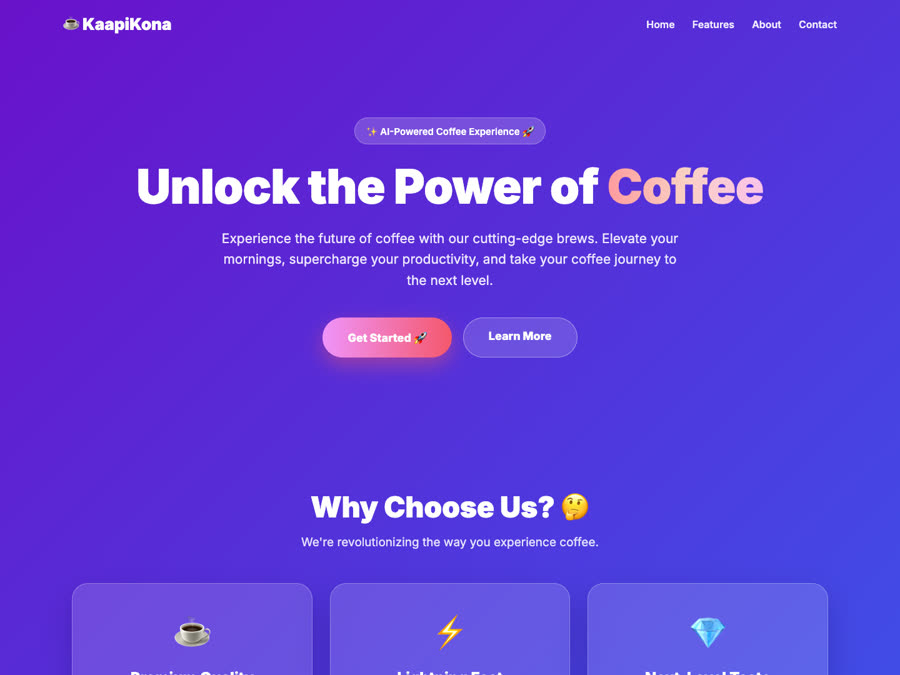
Bina rules ke AI ek hi type ki website banata hai. Ye nishaan dikhe toh samajh jao:
- Purple se blue gradient wala hero.
- Emoji icons features ke aage 🚀✨.
- Headline jaise "Unlock the power of…", "Your vision, our passion".
- Sab kuch center mein, glass jaise cards, ek jaisi spacing.


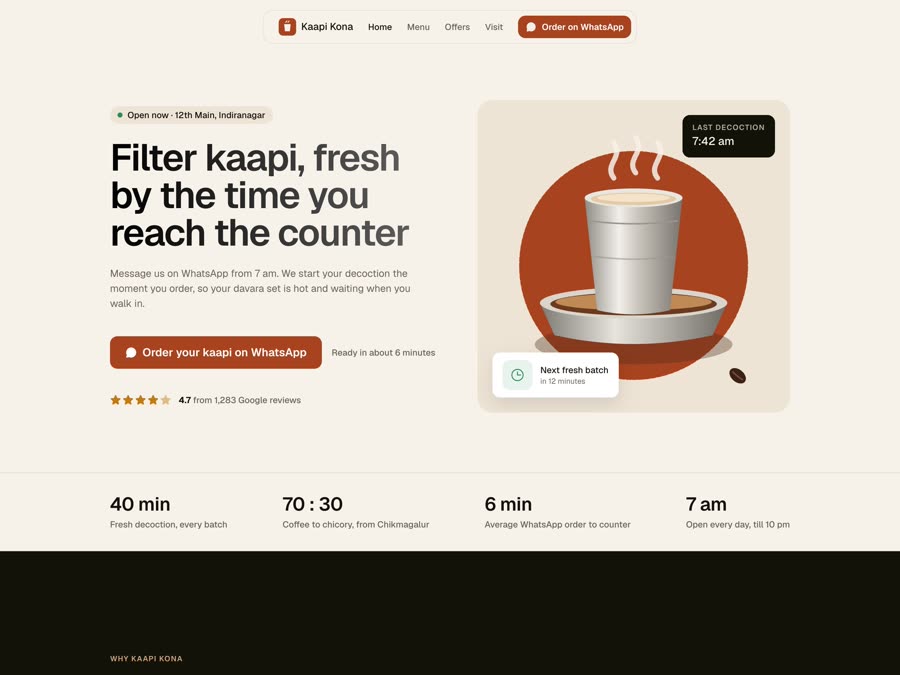
Dono pages humne banaye, ek hi example café ke liye. Kaapi Kona asli dukaan nahi hai.
landing-page-design: designer ke rules ek file mein
Skill ka rule simple hai: ek offer, ek audience, ek button. Do hisse hain:
- Part A, strategy: pehle sawaal (intake), phir page structure, copy, SEO.
- Part B, visual system: fonts, type scale, spacing, corner radius, background, icons, motion ke fixed rules. Ek tagline reveal section bhi zaroori hai.
Hum Anthropic ya is skill ke author se affiliated nahi hain.
Skill lo
Phone ya claude.ai pe: Claude app download karo: iPhone pe App Store, Android pe Play Store. Phir skill ki file download karo:
https://raw.githubusercontent.com/elayadesign/ai-design-skills/main/skills/landing-page-design/SKILL.md
Repo ka README khud kehta hai: claude.ai pe SKILL.md chat mein attach karo aur bolo "follow this". Ya Project mein upload kar do.
Laptop pe Claude Code ho toh: ek command, Node.js chahiye.
npx skills add elayadesign/ai-design-skills --skill landing-page-design
Skill .claude/skills/ mein aa jaata hai. Baad mein npx skills update se naya version.
Ye prompt bhejo, sawaalon ke jawab do
SKILL.md attach karke ye bhejo. Last line zaroori hai, taaki poori website ek file mein aaye:
Is file ko follow karo. Mere business ki ek page ki website banao. Shuru karne se pehle mujhse mere business ke baare mein sawaal poochho. Poori website ek hi index.html file mein do: CSS aur JavaScript usi file ke andar, koi bahar ki image link nahi.
Skill pehle ek saath sawaal poochta hai. Inme se kuch:
- Visitor ka ek kaam kya hai? Order, call, booking?
- Offer kya hai, exactly kya milega?
- Kiske liye hai, aur unki problem kya hai?
- Proof kya hai: reviews, numbers, photos?
- Brand ka tone: casual ya professional?
Kisi sawaal ka jawab nahi pata? Skill ka rule hai: woh ek line mein apna assumption likhega aur kaam rokega nahi.
WhatsApp order button chahiye? Ye bhi bol do. Link aisa hota hai (number country code ke saath, bina +, space ya dash ke):
https://wa.me/91XXXXXXXXXX?text=Hi%2C%20mujhe%20order%20karna%20hai
Format WhatsApp ke help page se. XXXXXXXXXX ki jagah dukaan ka number.
Skill se bani 6 example websites: café, bakery, salon, physio clinic, gym aur hardware store. Har ek isi skill file ko follow karke bani.
Saare businesses, reviews aur numbers example hain, asli nahi.
index.html, folder, Cloudflare Pages
- Claude ka code copy karo ya file download karo. Naam rakho
index.html. - Ek folder banao, jaise
sharma-store, aur file usme daalo. - Cloudflare pe free account banao.
- Dashboard mein Workers & Pages → Create application → Get started → Drag and drop your files.
- Project ka naam do, folder drag karo, Deploy site dabao.
Website live: project-naam.pages.dev. Ye address free hai. Website badalni ho toh project mein Create a new deployment.
Apna domain (jaise sharmastore.in) chahiye toh woh alag se kharidna padta hai. Pages.dev wala address free hai.
Client ka kaam free plan pe kahan?
- Vercel Hobby (free): sirf non-commercial personal use. Site banane ke paise liye, toh woh bhi commercial gina jaata hai. Vercel fair use
- GitHub Pages: online business chalane ke liye free hosting ki tarah use karna allowed nahi. GitHub Pages limits
- Cloudflare Pages free: humein uske limits page pe aisi koi non-commercial shart nahi mili. Phir bhi apna case ho toh terms padh lo.
Google Maps aur counter pe QR
Kyun? Log dukaan Google Maps pe dhoondte hain. Business Profile mein website ho, toh unhe seedha Website button dikhta hai.
- business.google.com pe dukaan ka Business Profile kholo.
- Edit profile → Contact → Website ke aage pencil.
- Poora link daalo,
https://ke saath, aur Save.
Steps Google ke help page se. Profile pe edit ka access chahiye.
QR kyun? Dukaan mein khada customer scan karke menu, offers aur WhatsApp order seedha phone pe dekh leta hai.
- Chrome, laptop: site kholo, page pe right click → Create QR Code for this page → download.
- Chrome, Android: ⋮ menu → Share → QR code → download.
Chrome version ke hisaab se naam thoda alag ho sakta hai. Print karke counter pe lagao.
Dukaanon ke liye website bana ke kamao
- Maps pe dukaan dhoondo. Website button nahi hai? Wahi mauka hai.
- Upar wale prompt mein dukaan ki details do: kya bechte hain, timing, address, WhatsApp number.
- Khaali haath mat jao. Pehle website bana ke le jao, dukaan wale ke phone pe kholo, WhatsApp button dabwa ke dikhao.
- Haan bole toh deploy, Business Profile mein link, aur counter ka QR.
Verma Opticals bhi example dukaan hai.
Ye jaanna zaroori hai
- Ek file wali site static hai. Login, payment ya database nahi. Form ka data kahin save nahi hoga. Order ke liye WhatsApp button sabse simple hai.
- Reel ki demo websites (Kaapi Kona, Verma Opticals aur gallery ki 5) example hain, asli dukaan nahi. Humne unhe Claude Code mein isi skill file ko follow karke banaya.
- Output check karo. Phone pe khol ke dekho, number aur address sahi hain ya nahi.
- Skill file padho use karne se pehle: repo.
Facts 6 Nov 2026 ko check kiye. Dashboard aur terms badal sakte hain.
Purani website sudharni hai?
Usi author ka redesign-skill (MIT) existing site ko diagnose karke upgrade karta hai, aur values isi landing-page-design file se leta hai. Isko humne test nahi kiya.
AI se video kaise banaye
Ye guide AI se video kaise banaye series ka hissa hai. Poori series yahan hai:

Claude skills ka shauk hai? Phone pe YouTube skills wali guide yahan hai. Poora video setup chahiye? Part 1 se shuru karo.
follow karo @techstackbro 👀